My Personality

Randy at Genea-Musings posted his personality type on his blog and asked his readers what their personality types were. He tested as ISTP (“reserved, methodical, spirited, and intense”).

Several other bloggers have reported their results, and here are mine:

Your Personality is Very Rare (INTP)
Your personality type is goofy, imaginative, relaxed, and brilliant . Â Â Â 

Only about 4% of all people have your personality, including 2% of all women and 6% of all men
You are Introverted, Intuitive, Thinking, and Perceiving.


Well, I would never have described myself as “goofy”, but maybe my nephew would. The “imaginative, relaxed, and brilliant” description is certainly flattering, but is it accurate? Somehow, I don’t think I would ever have combined those four adjectives to describe any one person, with the possible exception of Jerry Lewis.

Becky of kinexxions also scored as INTP. It would be fun to meet Becky and see how similar or dissimilar our personalities actually are.

Miriam of AnceStories also reported her results on these tests (she tested as INFJ: “introspective, principled, self critical, and sensitive”). She also wrote quite a bit about the interpretation of the results and the interactions of people with different personality types. Indeed, she writes:

…when conflict arises between two people, it generally comes down to the fact that one is a J and the other is a P

I think Miriam is right on target here, at least from my personal experience. There are times when I prefer to take a relaxed approach to a project, while those with whom I’m dealing will insist on more structure. To be honest, I work well with structure and planning, but I’m also very flexible and ready to change when circumstances change.

Jasia tested as ESFP, described as “playful, charming, open minded, and energetic”. She wasn’t sure if she would use these adjectives to describe herself, but I think I would.

Dana left a comment on Randy’s blog that her personality type was INFP. Is this Dana Huff of the Our Family History Blog?

Thanks, Randy, for pointing out this exercise. I might even ask my relatives to try it out during an oral history interview. It might be fun to have them take the test and then talk about how accurate they think the results are.

Posted in Daily Journal | 4 Comments

The Birth and Baptism of Marie Martin – 1806

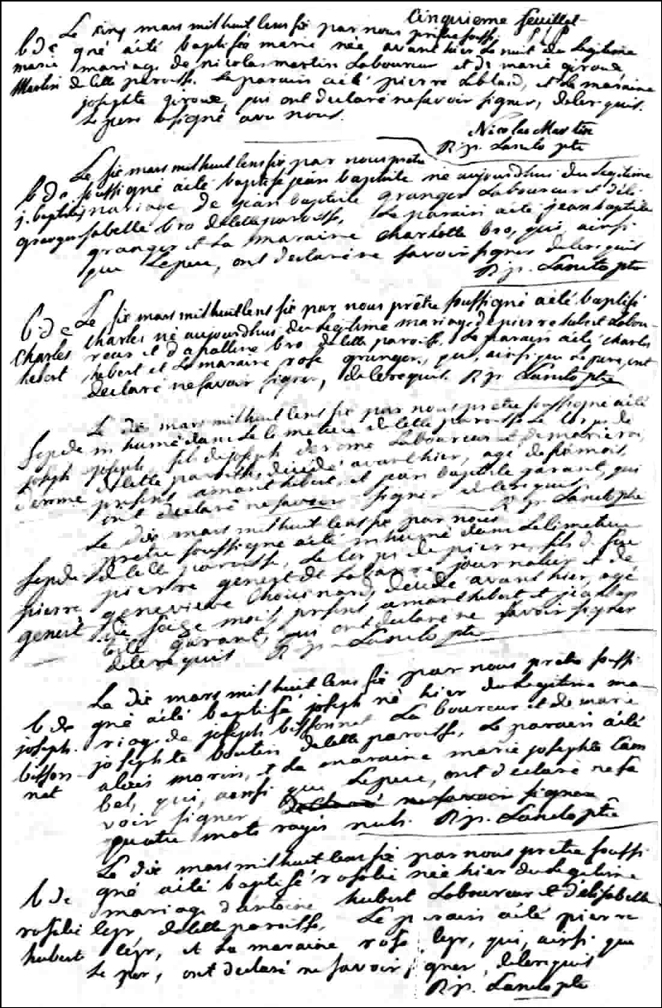
Continuing to follow the family of Nicolas Martin and Marie Giroux back in time, their daughter Marie was born on 03 Mar 1806. Her Birth and Baptism was recorded on the front of folio five, at the top of the page.

Birth and Baptismal Record of Marie Martin - 1806

The Birth and Baptismal Record of Marie Martin – 1806

SOURCE: Gabriel Drouin, comp. Drouin Collection. Montréal, Québec, Canada: Institut Généalogique Drouin. Parish of Ste. Marguerite de Blairfindie, L’Acadie, St. Jean County, Lower Canada, 1806. Birth and Baptismal Marie Martin, Front of Folio 5, B.

Click on the link for a PDF copy of the Birth and Baptismal Record of Marie Martin – 1806. Translated from the French, the record states:

Baptism of
Marie
Martin

      Fifth folio
      P[aschal] L[aneto] p[riest]
On the fifth of March, one thousand eight one thousand eight hundred and six, by us, the undersigned priest, was baptized Marie, born the night before last, of the legitimate marriage of Nicolas Martin, farmer, and Marie Giroux, of this parish. The Godfather was Pierre Leblanc and the Godmother was Josephte Giroux, who have declared that they do not know how to sign as required.
The father has signed with us.
      [signed] Nicolas Martin
      [signed] R[ené] P[aschal] Laneto, priest

This record can be found as image 5 of 34 in the Québec Vital Records (Drouin Collection), 1621-1967 on Ancestry.com in the records for L’Acadie L’Acadie Ste-Marguerite-de-Blairfindie in the year 1806. The record appears on the front of folio 5.

Copyright © 2007 by Stephen J. Danko

Posted in Daily Journal, Martin | Comments Off on The Birth and Baptism of Marie Martin – 1806

The Birth and Baptism of Jean Baptiste Martin – 1807

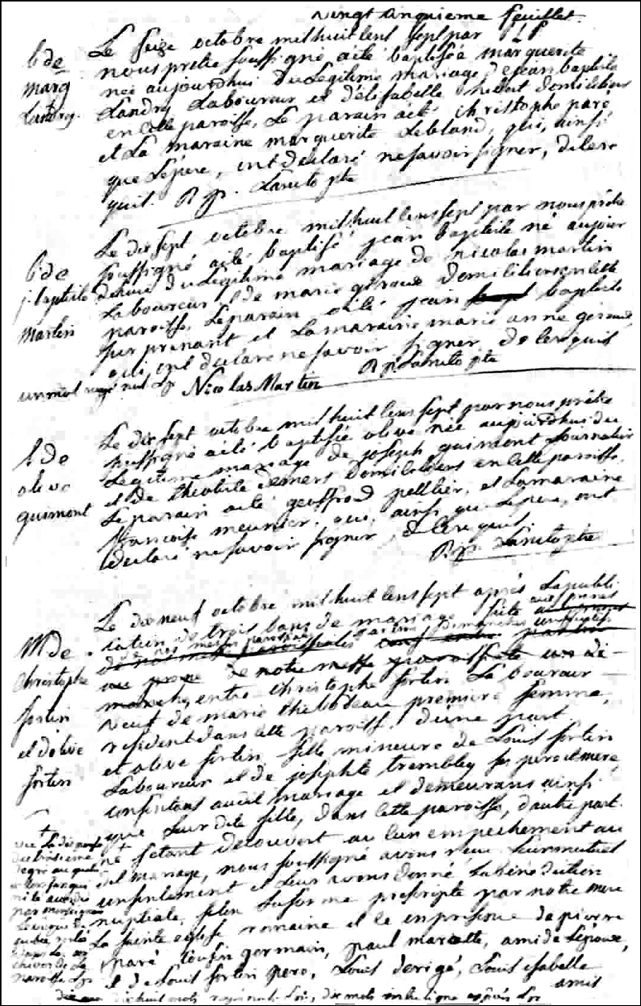
Another son of Nicolas Martin and Marie Giroux was born on 17 Oct 1807 and was named Jean Baptiste.

Birth and Baptismal Record of Jean Baptiste Martin - 1807

The Birth and Baptismal Record of Jean Baptiste Martin – 1807

SOURCE: Gabriel Drouin, comp. Drouin Collection. Montréal, Québec, Canada: Institut Généalogique Drouin. Parish of Ste. Marguerite de Blairfindie, L’Acadie, St. Jean County, Lower Canada, 1807. Birth and Baptismal Record of Jean Baptiste Martin, Front of Folio 25, B.

Click on the link for a PDF copy of the Birth and Baptismal Record of Jean Baptiste Martin – 1807. Translated from the French, the record states:

Baptism of
J[ean] Baptiste
Martin

On the seventeenth of October, one thousand eight one thousand eight hundred and seven, by us, the undersigned priest, was baptized Jean Baptiste, born today of the legitimate marriage of Nicolas Martin, farmer, and Marie Giroux, residing in this parish. The Godfather was Jean Bapt Baptiste Surprenant, and the Godmother was Marie Anne Giroux, who have declared that they do not know how to sign as required.
one word crossed out L[aneto] p[riest]

[signed] Nicolas Martin [signed] R[ené] P[aschal] Laneto, priest

This record can be found as image 25 of 38 in the Québec Vital Records (Drouin Collection), 1621-1967 on Ancestry.com in the records for L’Acadie L’Acadie Ste-Marguerite-de-Blairfindie in the year 1807. The record appears on the front of folio 25.

The priest crossed out one word in this record and made a note at the bottom that one word was crossed out. He signed this note with the initial of his surname and the letter p for príªtre – priest.

Copyright © 2007 by Stephen J. Danko

Posted in Daily Journal, Martin | Comments Off on The Birth and Baptism of Jean Baptiste Martin – 1807

Megan and Me at Jamboree

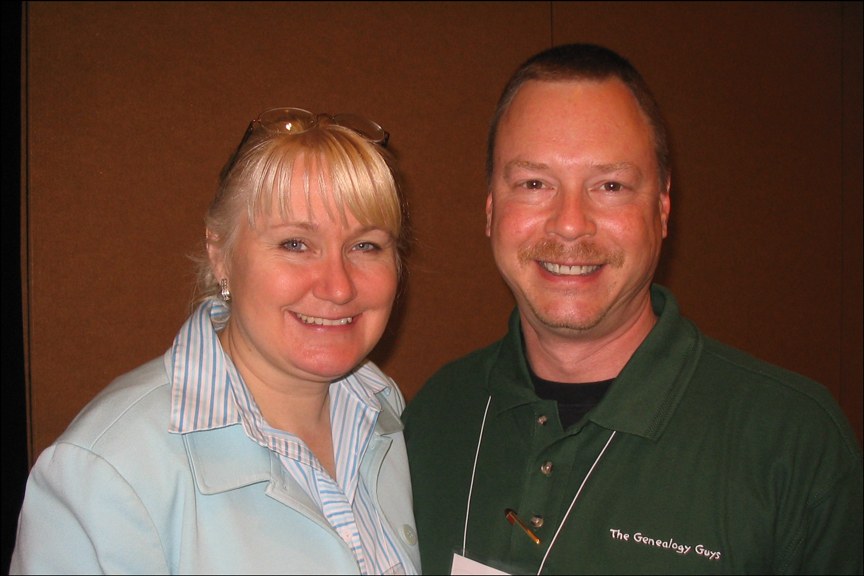
I don’t have much time to blog today, but here’s a photo of Megan Smolenyak Smolenyak with me at the Southen California Genealogy Jamboree a week ago. Megan and I talked for a bit and she tried to convince me to try vlogging . Hmmm, well, I was thinking of taking some videos when I’m on the east coast in July. Well, we’ll see how it goes…

Megan Smolenyak Smolenyak and Steve Danko at Jamboree 2007

Megan Smolenyak Smolenyak and Steve Danko at Jamboree 2007

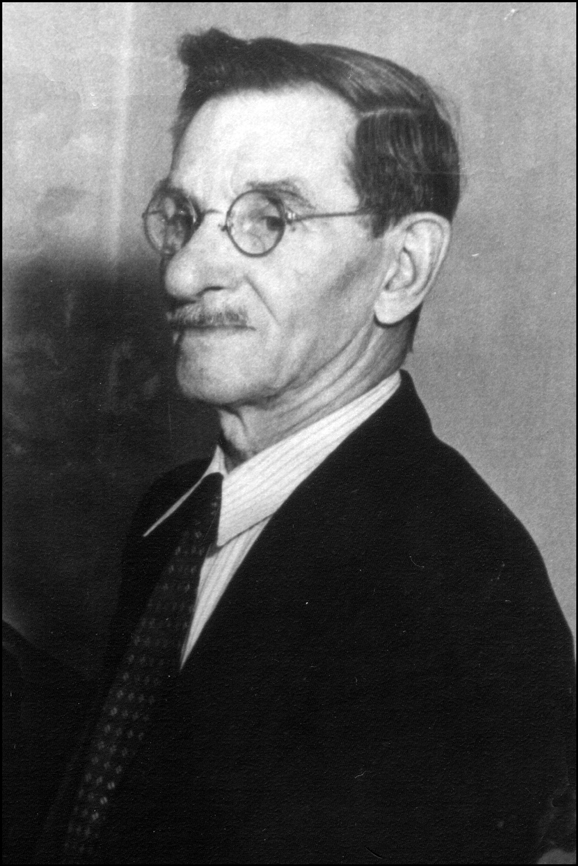
And, while you’re here, take a look at my photo above and my grandfather’s photo below. Do you see any family resemblance? Right now, I’m 19 years younger than my grandfather was when the photo below was taken.

Copyright © 2007 by Stephen J. Danko

Posted in Daily Journal | Tagged | Comments Off on Megan and Me at Jamboree

My Galician Grandfather

Birth and Early Life

My paternal grandfather, Michael Danko (Michał Dańko), was born in Nienadowa, Galicia on September 22, 1877, the son of Jakub Dańko, a farmer, and Agnieszka Sowa. He was delivered by the midwife Agnieszka Pilch, and was baptized in the Roman Catholic parish church in Dubiecko, Galicia on September 23, 1877 by the Reverend [H. Karakulski?]. His Godparents were Andrzej Giergont and Marianna, the widow of Kazimierz Fudali.

Michael Danko - 1948

Photograph of Michał Danko – 1948

Michał had a number of siblings, but the only ones I’ve confirmed are Marianna, born 12 Jan 1884, and Marcin, born 11 Dec 1890. His mother reportedly died in 1895 or 1896, after she fell while picking cherries.

After the death of his mother, Michał’s father married Zofia Głowacz on 03 Sep 1896, and Zofia gave birth to Michał’s half-brother, Piotr Dańko, on 28 Jun 1898.

Marriage and the First Children

Michał married Marianna Dziurzyńska (Marianna Dziura) on 14 Aug 1898, probably in the Roman Catholic parish church in Dylągowa. The pair met only shortly before the marriage, which was apparently arranged.

Over the next few years, Michał’s wife gave birth to three children. The first was probably a son named Karol, but the details of this birth are missing. As a young child, Karol died in Galicia. A daughter, Zofia, was born on 12 Jan 1901, and a son, Jan, was born on 02 May 1905.

Immigration to the United States

When Michał was 27 years old, he set off by himself for Antwerp, boarded the S.S. Vaderland on 25 Feb 1905 and arrived in New York City on 07 Mar 1905. Upon arriving in New York, he was met by Isaac Flichtenfeld, a Jewish umbrella maker from Galicia, residing at 35 First Avenue in New York City. Michał had but $6 in his pocket when he arrived in America.

For reasons unknown, my grandfather then traveled to Worcester, Massachusetts, where he would spend the rest of his life.

Family Arrives in Worcester

Michał’s wife, daughter, and surviving son arrived in New York on the S.S. Vaderland on 24 May 1909, and his sister, Marianna, arrived on the S.S. Kaiserin Auguste Victoria 26 Jun 1909.

Paweł Goliński, the future husband of Michał’s sister Marianna, and Jan Dziurzyński, Michał’s brother-in-law, traveled together and arrived on the S.S. Grosser Kurfurst on 21 May 1912.

Jan Dziurzyński returned to Galicia sometime after 1930, but Paweł Goliński and Marianna Dańko Goliński lived near Michał in Worcester all their lives.

Home and Hearth

In 1909, when his wife and children arrived, Michał was living at 9 Redding Court, a house located between the Rural Cemetery and the railroad tracks. The railroad tracks were, in fact, directly behind the house.

In 1910, the family was living a block away at 3 Moran Court. The railroad tracks ran directly behind this house, too. The family shared their small, rented house with seven boarders, all Polish immigrants.

By 1920, the family had moved to 19 Prescott Place, and still the railroad tracks ran right behind the house. The family lived in this house for a while. They were still living there in 1930.

By 1942, the family was living at 15 Henchman Street. This house was just on the other side of the railroad tracks from the previous houses in which the family lived.

All these houses have now been demolished.

The family never lived in “The Island” where most of the Polish community in Worcester was located.

More Children

Over the next years, Michał’s wife gave birth to several other children in Worcester: Stanisława, born 13 May 1910; Bronisława, born 03 Jan 1912, died 13 Jan 1913; Michael, born 13 Sep 1913; Bronisława, born 28 Oct 1915; Mary, born 07 Oct 1917, Joseph, born 02 Sep 1919; Helen; and my father, Francis.

The Great War and the Second Polish Republic

On 12 Sep 1918, Michał registered for the World War I draft, although he was not asked to serve.

On 11 Nov 1918, the Second Polish Republic was formed. My grandfather probably celebrated the liberation of his homeland from over a century of occupation by Austria. Because Michał was born in Galicia, the Austrian partition of Poland, he was legally a citizen of Austria, although his ethnicity was Polish.

In both the 1920 and 1930 censuses, Michał reported that he had filed his Declaration of Intention to become a citizen of the United States. I have not found any evidence that he actually did become a citizen.

Education and Employment 

I was told that Michał was well-educated and worked as a teacher in Galicia. At the time he immigrated to the United States in 1905, he could read and write, although he probably couldn’t speak English very well, if at all. By the 1910 census, he reported that he could speak English. His wife never learned to speak English.

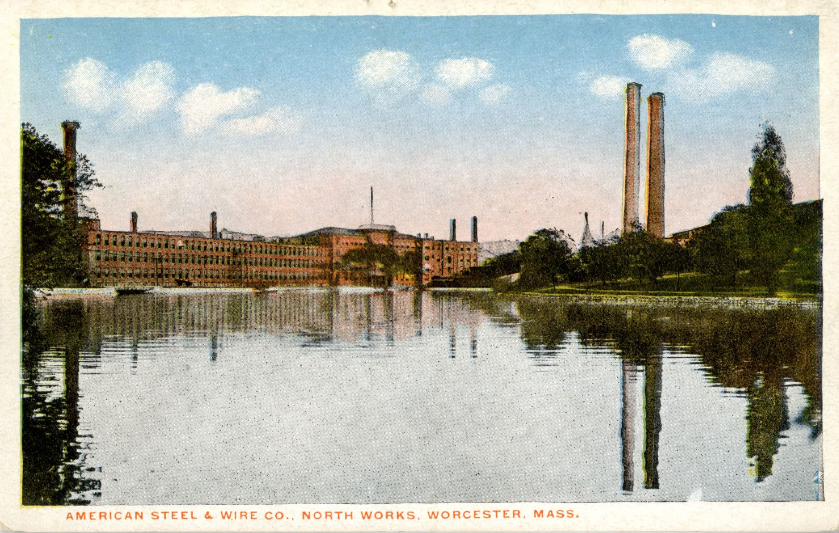
American Steel and Wire - North Works

Postcard of American Steel and Wire – North Works

Like many Polish immigrants, Michał found employment at the American Steel and Wire plant located just a few blocks from where the family lived. There, he worked as a Wire Straightener or a Wire Cutter, among the most difficult and lowest paying jobs available.

With the onset of the Great Depression in 1929, Michał was unemployed much of the time.

World War II

Michał registered for the World War II draft on 27 Apr 1942 as part of the “Old Men’s Draft”.

By the time he registered for the draft, three of his four sons were already serving in the military. His son Michael served in the U.S. Navy, Joseph served in the U.S. Army, and Francis served in the U.S. Naval Armed Guard. All three sons survived the war.

The Children Leave Home

By 1920, Michał’s daughter Zofia (Sophie) left home and was living and working in a boarding house. Soon after, she moved to Albany, New York.

In the early 1930s, Michał’s children Stanisława (Statia), Jan (John), and Helen followed Sophie and moved to Albany . Finally, in the 1940s, Francis and Michał’s wife, Marianna, also moved to Albany, leaving Michał by himself.

Michał’s children Bronisława (Bertha), Mary, Joseph, and Michael continued to live in Worcester.

Michał’s Death and Funeral

Michał died alone in a rooming house at 47 Main Street in Worcester on 02 Jan 1953 at age 76. His death was discovered by his son, Michael. Death was due to arteriosclerotic heart disease.

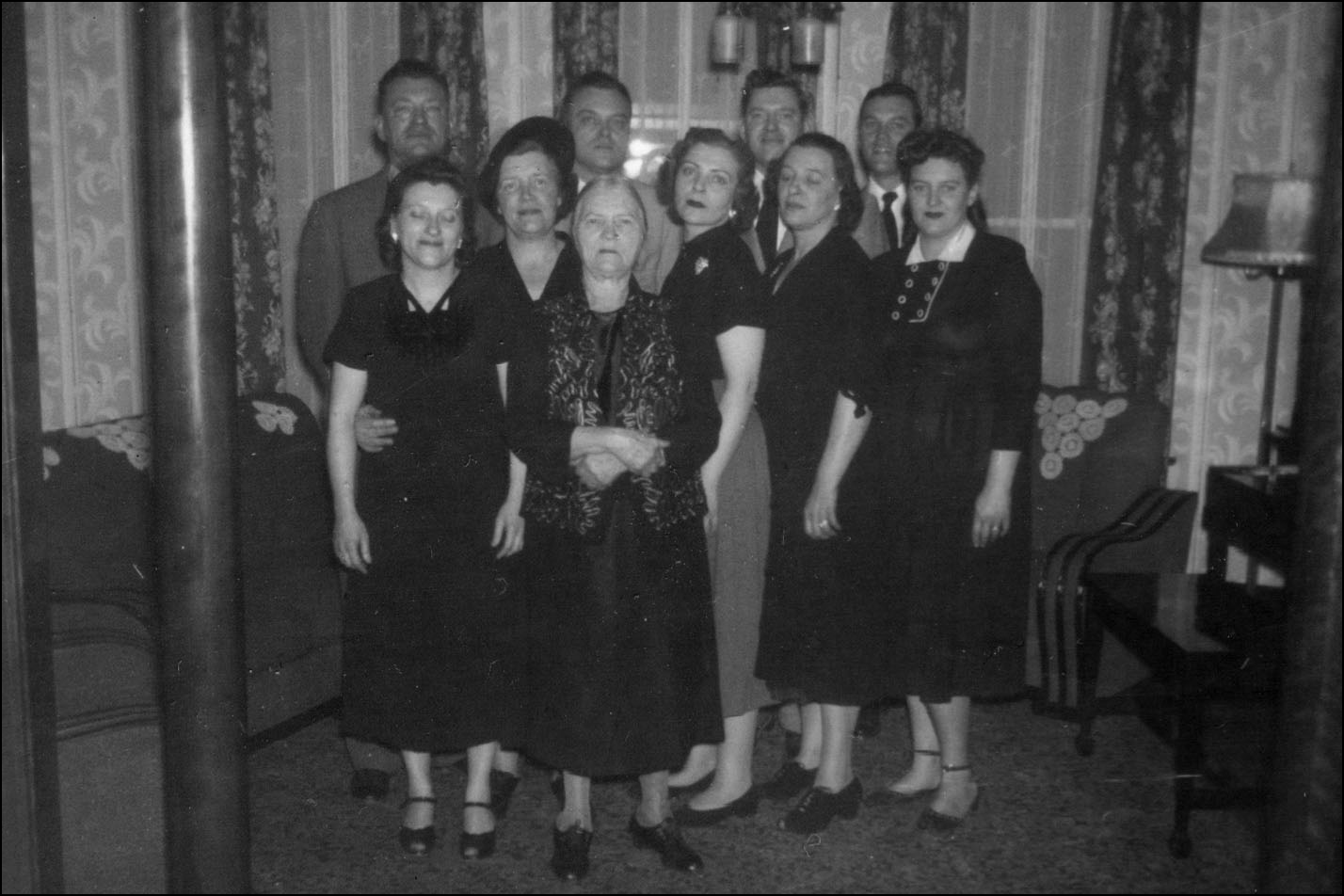
Michael Danko Family

The Family of Michał Dańko – 1953

His wife and children all gathered in Worcester to mourn his passing. The only photographs I have of all Michał’s children together were taken at the time of his funeral.

Copyright © 2007-2026 by Stephen J. Danko
Posted in Daily Journal, Dańko, Dziurzyński, Głowacz, Goliński | 4 Comments

Sunday at Jamboree 2007 – Publishing Your Family History

The final session I attended at Jamboree 2007 was a panel discussion on Publishing Your Family History with experts Jim McNamara, Loretto (Lou) Dennis Szucs, and Tom Underhill.

Jim McNamara has a background in technical writing and is the British Isles Family History Society – USA Newsletter editor.

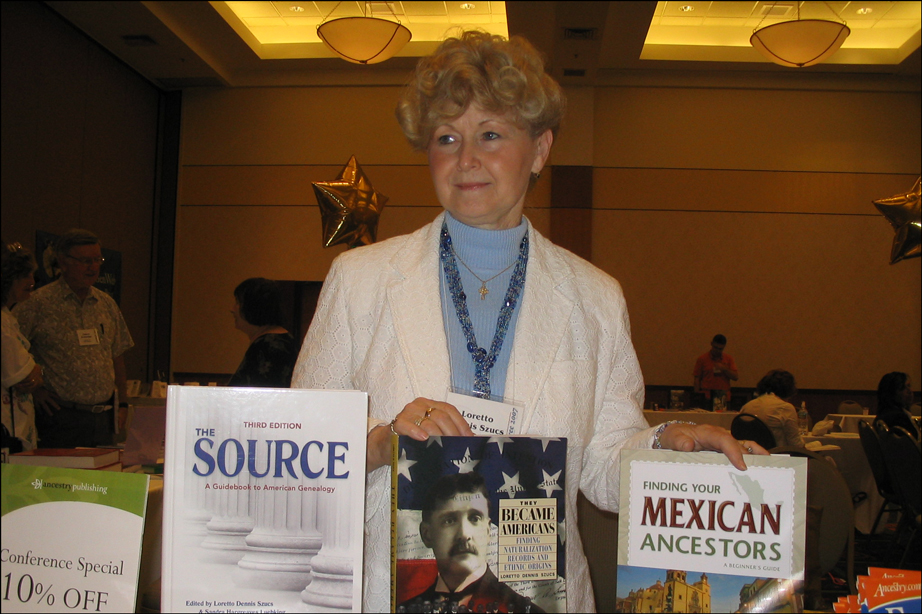
Lou Szucs at Jamboree 2007

Lou Szucs at Jamboree 2007

Loretto (Lou) Dennis Szucs is executive editor and vice president of community relations for Ancestry.com. Some of Lou’s publications are The Source: A Guidebook to American Genealogy (co-editor Sandra Luebking), They Became Americans, Chicago and Cook County Sources, A Guide to the National Archives Field Branches (with Sandra Luebking), and Finding Answers in U.S. Census Records (with Matt Wright) . 

Tom Underhill is publisher and senior designer at Creative Continuum, a company that designs and publishes short-run books.

Since the format of this session was a panel discussion, the information exchanged consisted of answers to questions from the audience. Q = Question, A = Answer, C = Comment.

Q:  I’ve already written everything. What is my next step?
A:  Decide who your audience will be – who will want to read what you’ve written? Self-publish if the audience will be small.

Q:  But I don’t want to self publish. I want to start at the top.
A:  Most royalty agents don’t want to risk publishing if they can’t make money on the venture. A smaller publisher will give you full control over your book. You will still own the copyright and control, and you can always go to a larger publisher later on.

Q:  Might there not be academic presses that would be interested? Where can I publish my ancestor’s Civil War Diary?
A:  Go to a genealogy society in the area where your ancestor lived. Submit a smaller article to a military magazine first – this may launch an opportunity for a larger article. GuterbergPress.org is a way to self-publish, but you’ll be giving your work away.

Q:  How do I start to write my Family History?
A:  Take a life history writing class. Get a lot of criticism. Go to the Southern California Genealogical Society writer’s group and have them criticize your writing.

C: Think about what made your ancestors’ lives different. What was everyday life like? Read historical fiction to see how other authors paint the setting. Use all five senses when writing. Write about saddling the horse, opening the door. Describe emotions.

Q:  My grandfather wrote a book that is out of print. What can I do with it?
A:  Find out if the book is still under copyright. If it is, you will need the permission of the heirs – the people who now own the copyright – to reprint it. If the book is out of copyright, you can just reprint it.

Q:  How many copies should I print?
A:  Find out where the breakpoint is for cost. It may be less expensive to print the number of copies you need plus 25 extra than it will cost if you print a number of copies and then have to print 3 more.

C:  Nobody is publishing their information. More people should publish and deposit their family history in the Family History Library. If the book needs to be revised later, the author can always print a new edition. The value of loose papers is much less than that of a published book.

Q:  What should I write about? Why would anyone want to read what I’ve written?
A:  I would read what you write because nobody else has your experiences. In two generations, what you write will be ancient history. Wouldn’t you love to have a family history published by your ancestors?

Q:  What’s your impression of print-on-demand services like Lulu?
A:  Books from print-on-demand services are as good as the person who designs the book. Paperback books will not be archival quality.

Q: Â How should I publish transcriptions of county records?
A:  A book version of transcriptions is designed to last, even if most people want a searchable digital form.

Q:  How do people find these family histories?
A:  Publishers promote books to suitable groups.

C:  Don’t trust everything to electronic media. It’s better to save to paper to ensure longevity.

Q:  What advice can you give for indexing a family history?
A:  In an index, more detail is better. An index entry for “Smith, John, marriage”, or “Smith, John, career” is more useful than just “Smith, John”. An entry such as “Smith, John, born 1824” is more useful than just “Smith, John” when many people have the same name. Highlight what you want to index in the text. Don’t trust the computer to index itself.

Q: Â What about citing sources?
A:  Most people don’t read the sources, although sources help to prove the accuracy of the material and may help others find addition information.

C:  Include maps of the time period. Show how things have changed. Draw maps and tell stories.

C:  Some publishers will design, scan, and manage your book. Some require you to do everything on your own.

Q:  I like to write fiction. How can I get my book published?
A:  There are many examples of people who self-published their book, and then the book was picked up by a major publishing house. If you sell 1000 copies of a self-published book, you stand a better chance of being picked up by a major publishing house than if you sell only a few copies.

Copyright © 2007 by Stephen J. Danko
Posted in Daily Journal | Tagged | Comments Off on Sunday at Jamboree 2007 – Publishing Your Family History

Sunday at Jamboree 2007 – Suzanne Russo Adams

Suzanne Russo Adams, AG®, the Professional Services Desk Manager for the Generations Network, presented a lecture on “Getting the Most from Ancestry.com”, based on George Morgan’s recently published book The Official Guide to Ancestry.com.

Suzanne Russo Adams at Jamboree

Suzanne Russo Adams at Jamboree 2007

George’s book was certainly popular at Jamboree. The folks at the Ancestry.com booth sold all the copies they brought with them and were directing those looking to buy the book to other vendors.

Suzanne explained that her talk would discuss the purpose of the website, how you can effectively use the site, the location of search tips and a tutorial, and the strengths and limitations of the website and its search engine.

The Ancestry.com Home Page and What’s New?

Upon opening the Home Page of the site, the researcher is presented with a set of search boxes that can be used to search the site. To the right of the search boxes, under the heading “What’s New on Ancestry.com” is a listing of the most recently added content, and within that box is a link to “What Else is New?” Clicking on that link brings the researcher to a whole lot more information on new databases, articles, and enhancements to the site.

Searching Ancestry.com 

There are several ways to search Ancestry.com, depending on what you want to find. For help with search options, one can click on “Search Tips” (found under the “Search” tab) or go to “Help” and type in “Search”.

To search the entire site for a specified name, one can use a Global Search. Ancestry separated the Global Search on the Home Page into four tabs in order to provide specialized search fields for particular records. When searching Historical Records, available search fields are: First & Middle Name(s), Last Name, Birth Year, Birth Country, Death Year, and Death Country. When searching Photos & Maps, available search fields change to Keywords, Country, and Year Range. Specialized search fields for particular record groups makes a lot of sense.

Ranked Searches

Unless the “Exact Match” box is checked, Ancestry.com will perform a Ranked Search, which searches for close matches. Ancestry uses a name authority dictionary to find close matches for both first and last names. In this way, if a researcher enters “Joseph” in the search box, a Ranked Search may be able to find people entered with the first name “Joe” as well as those entered as “Joseph”.

Ancestry ranks names first, and ranks dates and places as a lower priority.

Exact Searches 

Exact Match Searching allows the researcher to specify which search terms must match the index exactly. At the bottom of the search results page is a set of search boxes that allows one to refine the search. By clicking the “Exact Matches Only” check box, only those results that match the search terms exactly will be displayed. The only exception to this exact match feature is a choice to search an exact surname or a set of Soundex matches. Clicking the “Advanced Search” link allows the researcher to specify which search terms must be an exact match and which search terms can be close matches (ranked search, see below).

One item of note when searching Census records is that the birthplace is indexed only by Head of Household.

When searching, the researcher need not enter every piece of information in the search boxes. Sometimes less information will yield better search results.

Alternate Spellings 

When viewing search results, a triangle will sometimes appear next to a name in a Census Record. This triangle indicates that Ancestry.com entered an alternate spelling in the index, because the Census Records were first indexed by Head of Household and again by all names. Sometimes the indexes resulting from these two indexing operations led to different spellings of the names. Both spellings are included in the index. If a user has added a spelling correction, a cartoon “talk balloon” with a yellow plus sign will appear.

As an example, my grandfather’s record in the 1920 US Federal Census shows three spellings: Kostanty Pudgealkoski, Kostanty Niedzialkoski, and Kostanty Pudzealkoski. The first spelling was apparently entered when the census was indexed by Head of Household. The second spelling is the correction I entered when I saw that his name was badly transcribed, and is annotated with a “talk balloon” with a plus sign. The third spelling was apparently generated when the census was transcribed as an every name index, and is annotated with a yellow triangle.

The incorrect transcriptions unfortunately remain attached to the record, and the first incorrect transcription will be the name that appears in the search results. This means that someone searching for Kostanty Niedzialkoski will have to click on Kostanty Pudgealkoski in order to see the correct spelling. In this case, I doubt most people searching for my grandfather would be able to find him in the census, since Pudgealkoski is so far off from the correct spelling. The Ancestry.com transcribers mistook a curlicue at the upper right end of the letter “N” for a “P”.

Wildcard Searches

Another search strategy is to use wildcards to search for names. The asterisk symbol * replaces from 0-6 characters and the question mark symbol ? replaces a single character. When using wildcards, the researcher must specify at least three letters before using a wildcard.

Wildcards can be used for years, too. A search for 187* will search all years for the entire decade from 1870-1879.

Making Corrections and Adding Comments

If a researcher finds an incorrectly indexed record, a missing image, or wishes to add a comment to a record, the Comments and Corrections link allows the researcher to correct misspelled names, add alternate spellings, add a comment, or report a problem with an image. Corrections may take up to 3 months to appear, depending on when the next regularly scheduled update takes place. The original transcriptions will not be removed, but the corrections become searchable by all users . 

Users of Ancestry.com can upload or directly enter their family trees on the site, and link records to the individuals in their family tree. Owners of these trees can edit or delete the trees as they find new information and correct errors . Owners of these trees can specify whether the trees are public or private. If they wish, tree owners can also invite family members to view the trees and can also assign privileges of Guest, Contributor, or Editor to these invited family members, allowing these trees to become a family or community project.

Other Features 

The Ancestry Community permits interactions with other users through Message Boards, Member Directories, and Member Connections.

The Ancestry Learning Center includes many articles, columns, instructions, and excerpts from Ancestry books and magazines.

The Ancestry Store provides an online shopping solution for those who wish to purchase genealogy-related books, CDs, maps, photographs, and gifts.

Copyright © 2007 by Stephen J. Danko

Posted in Daily Journal | Tagged | Comments Off on Sunday at Jamboree 2007 – Suzanne Russo Adams

Sunday at Jamboree 2007 – Susan Kitchens

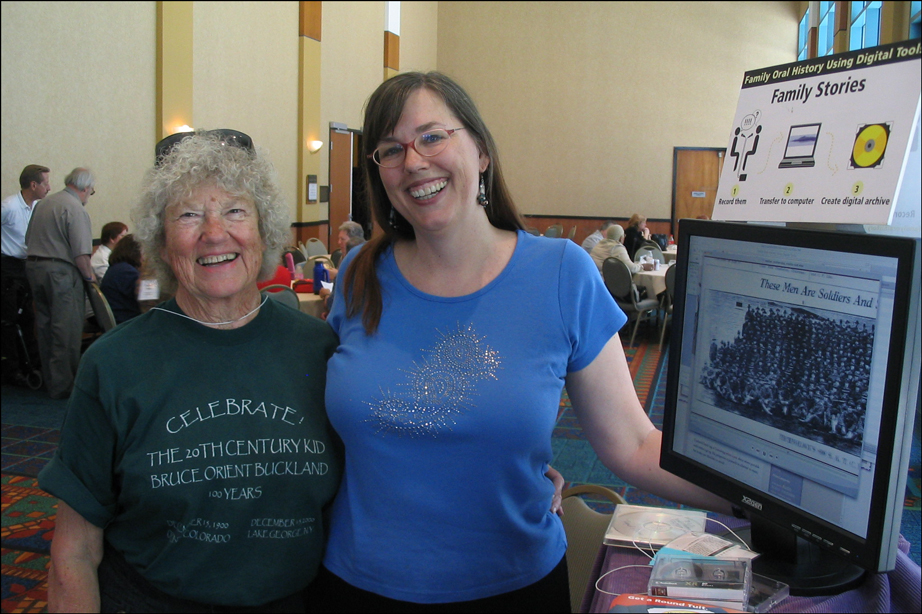
Susan Kitchens attended the Southern California Genealogy Jamboree as an exhibitor, showing attendees how to record oral family histories using digital tools.

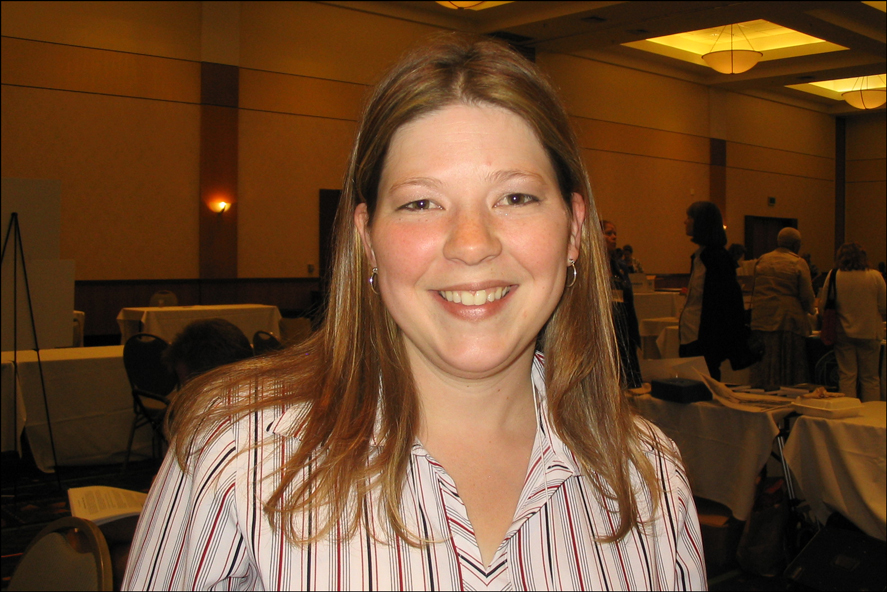
Susan Kitchens at Jamboree 2007

Susan Kitchens and Her Mother at Jamboree 2007

Susan is a prolific blogger who maintains at least three blogs: family oral history using digital tools, 2020 Hindsight, and AuntiAlias & Associates.

One of Susan’s recent blog articles from 13 Jun 2007 talks about an exercise to spot the fake smile. I tried to spot the fake smiles and came up with a score of 10 out of 20 correct. That means I did no better than I would have done by randomly guessing. Susan, herself, scored 17 correct, and Jasia of Creative Gene scored 16 correct.

I’ve been reading Susan’s blogs for a while and if there’s anyone who is qualified to demonstrate how to use digital tools to record oral family history, it’s Susan.

Back in March, I read Susan’s blog entitled Have a video iPod? Get a Belkin TuneTalk. I’d been thinking for a while about buying an iPod so I could listen to podcasts without having to burn the podcast to CD, but I couldn’t justify the purchase just to listen to podcasts more conveniently. After reading Susan’s article, I suddenly had another reason to get an iPod.

When I visit my family, I often interview them about their lives and those of their ancestors. Up until now, I’ve just scribbled everything down in longhand, hoping I recorded everything accurately. I’ve thought about buying a digital audio recorder, but the ones in which I’m most interested are rather pricey. I’ve thought about buying a digital video camera, but I’m not crazy about lugging a digital video camera around with me as I’m flying from coast to coast and from house to house as I visit relatives.

An iPod accessorized with a Belkin TuneTalk seems to be a great option for me. I could carry the iPod and TuneTalk with me in my pocket, and it would always ready for me to use wherever I am.

And so, I recently purchased an iPod Video and, today, I purchased a Belkin TuneTalk. I’ll play with it a bit in the next couple of weeks so I’ll be able to use it confidently during my trip to visit family on the East Coast in July. I also bought a DLO TransPod so I can listen to the content on my iPod through the stereo in my car. So far, everything seems to be working well.

But I’m supposed to be writing about Susan Kitchens, here, not about myself!

Susan is gracious, gregarious, knowledgeable, and genuinely helpful. I was able to speak with her for a while at Jamboree, although she was so busy with the mobs of people at her booth that I actually spent more time talking to her mother!

Susan showed people at her booth the Belkin TuneTalk, but she didn’t have an iPod Video with which to demonstrate. Luckily, I had my iPod Video with me, so I offered the iPod to Susan to demonstrate TuneTalk. I was pleasantly surprised by the quality of the recording. The TuneTalk records in stereo, can be used with any line-level input such as an external amplified microphone, and has an auto-gain switch to optimize most recording situations. The auto-gain switch should be turned off when using an external amplified microphone or when recording in loud situations.

Susan pointed out that the TuneTalk employs omni directional microphones, and so is not ideal in an environment with a lot of background noise, such as a trade show. Indeed, while the quality of the recording was excellent, I could hear not only Susan and the woman she was interviewing, but I could also hear the voices of everyone else nearby.

Susan also demonstrated recording oral family history using a different setup with directional microphones, in which case the voices of the interviewer and the person being interviewed are isolated from the ambient noise. Quite nice!

Well, I’m now all set to start recording oral family histories in July. Thanks for your advice and help with this, Susan! And it was great to meet you and your Mom!

Copyright © 2007 by Stephen J. Danko

Posted in Daily Journal | Tagged | 4 Comments

Sunday at Jamboree 2007 – Leland Meitzler

The last lecture I attended in the morning at Jamboree 2007 was “Finding the Women in Your Pedigree” presented by Leland Meitzler.

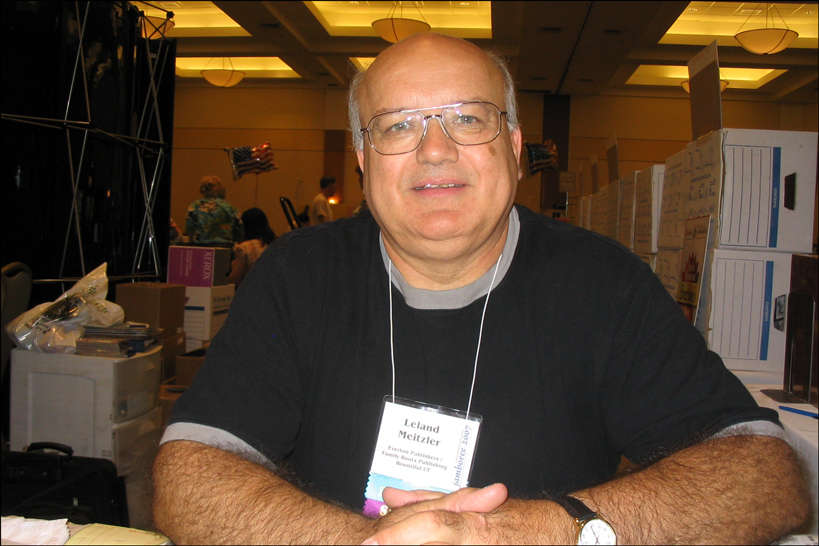
Leland Meitzler

Leland Meitzler at Jamboree 2007

I was a few minutes late getting to Leland Meitzler’s lecture and couldn’t find an empty chair in the lecture hall. Nonetheless, I found a couple of square feet of empty floor space and enjoyed the lecture from there.

Leland talked about 23 sources to find the women in your pedigree.

  1. Marriage records, including marriage applications, marriage licenses, marriage bonds, marriage returns, marriage certificates, and permissions to marry. These records will often list the maiden name of the bride and, if the bride is underage, a marriage consent will list the name of a parent with the parent’s signature.
  2. The Family Bible will often be full of maiden names. The most difficult part of researching the Family Bible is finding out who owns the Bible. Typically, the person who has possession of the Bible was often the person who got their hands on it first.
  3. Death Certificates are a relatively new invention, and frequently provide maiden names. Unfortunately, the person who provided the maiden name for a death certificate sometimes wasn’t a very good source for the name.
  4. Federal Census Records may provide useful information on maiden names if in-laws were living with the family. Sometimes the same in-law will be listed in the census with more than one family, providing information on the maiden name for multiple daughters.
  5. State Census Records may provide more information than Federal Census Records since the State Census asked different questions than the Federal Census did. State Census Records may show if a couple was married in the last year and may even provide maiden names.
  6. The International Genealogy Index is a source for maiden names, but should be used with caution, since the reliability of user-provided information is sometimes questionable.
  7. Cemeteries can show a variety of family relationships. Look at who is buried in the family plot and who is buried nearby.
  8. Birth Indexes may provide the maiden name of the mother.
  9. State Specific Indexes and Collections such as the Barbour Collection and the Ricker Collection can be a very useful source of maiden names.
  10. Surname Files found in nearly every library with a genealogy collection should not be overlooked.
  11. Historical Society Questionnaires are another source for maiden names.
  12. Obituaries and Death Notices frequently provide the maiden name for deceased women, but may also provide the names of siblings, parents, and other survivors.
  13. Cards of Thanks can be a rich source of names, since they often provide the names of everyone who attended a funeral.
  14. D.A.R. Lineage Papers and Books are a great source of names for those who can trace their ancestry back to the American Revolution.
  15. Funeral Home Records can be a great source of names, especially because funeral homes often have a close association with cemeteries and courthouses.
  16. Death Registers in the town hall provide a source of information that frequently precedes Death Certificates required by the state.
  17. State Hospitals are often reluctant to release information, but a request from a direct descendant looking for information for medical reasons and the signature of a medical doctor may open doors.
  18. Church Membership Records are another useful source of names for tracing the women in your family.
  19. Church Marriage Records, like civil registrations of marriage are some of the best sources of maiden names.
  20. Church Birth Records may directly provide the maiden names of the mother. The Godparents or witnesses may also be related to the mother and may provide clues to the mother’s maiden name.
  21. Pension Files and Bounty Land Files are possibly an unexpected source of information about female ancestors. Sometimes laws changed after a pensioner had died, and so descendants applied for the pension. Women had to provide a lot of genealogical information for her claim. The widow had to provide proof of marriage.
  22. Deeds may show family relationships and maiden names.
  23. Social Security Applications provide the maiden name of a woman even when the SSDI lists only the married name.

Leland recommended Christina Schaefer’s book for more information (the citation below was automatically generated according to the Chicago Manual of Style at Worldcat.org):

The Hidden Half of the Family

Schaefer, Christina K. 1999. The hidden half of the family: a sourcebook for women’s genealogy. Baltimore, Md: Genealogical Pub. Co.

Copyright © 2007 by Stephen J. Danko

Posted in Daily Journal | Tagged | Comments Off on Sunday at Jamboree 2007 – Leland Meitzler

Sunday at Jamboree 2007 – Drew Smith

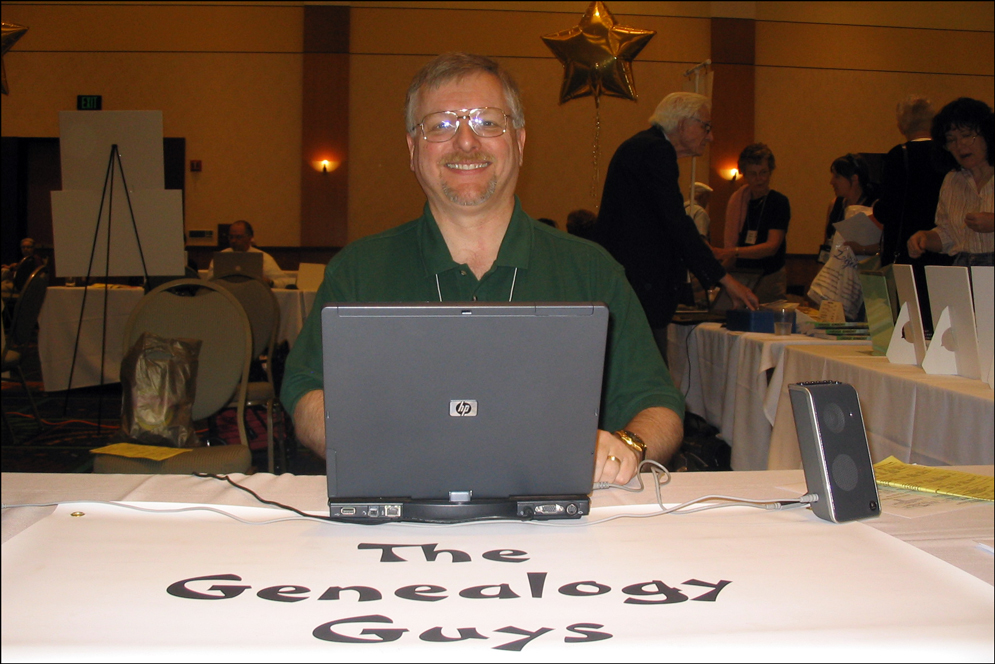
Drew Smith of the Genealogy Guys Podcast presented a lecture on “What’s My Next Step? The Organized Genealogist” on Sunday morning. When Drew previously presented this talk for a Jewish organization, he titled it “Doing Genealogy without the Guilt”.

Drew Smith at Jamboree 2007

Drew Smith at Jamboree 2007

All too often, we find ourselves guilty of having unaswered e-mail, obtaining the same information more than once, being unsure of where we are in our research, and having piles of unfiled papers and unentered data. Reasons we are guilty range from depending too much on our limited human memory, to not having a view of the big picture, to lacking a plan, and to lacking a system to keep ourselves on track.

Drew presented ten ideas on how to keep ourselves organized:

  1. Look at everything you already do to stay organized, identify what is already working, and apply those techniques to other parts of your life.
  2. Identify your workspace, organize that space, even if you have to make messes elsewhere, and continue to organize and push out further.
  3. Identify your activities and group together everything you need to perform those activities.
  4. Items you use frequently should be within reach, while those items you use less frequently should be further away.
  5. Locate the items you need where you can see them. Use transparent containers, standup file organizers, and wall calendars. Items that are out of sight are frequently out of mind.
  6. Identify your goals for the year, break them up into manageable pieces, and make them visible. Review your goals at the beginning of each year.
  7. A project is anything that takes more than one step. Decide what your next step is on each of your projects and make a list of these steps to form a “To Do” list.
  8. Keep a folder for reminders of phone calls, emails, and orders for which you are waiting. Assign a date to these things and put them on your “To Do” list.
  9. Put all incoming materials in a single location. Keep the wastebasket handy.
  10. Organize your tasks according to where you need to be to perform those tasks. Check your “To Do” list so you can accomplish tasks for a single location at the same time.

Drew recommended three books for organizational techniques (citations for these books were automatically generated according to the Chicago Manual of Style at http://www.worldcat.org):

Allen Getting Things Done

Allen, David. 2001. Getting things done: the art of stress-free productivity. New York: Viking.

 Morgenstern Organizing

Morgenstern, Julie. 2004. Organizing from the inside out: the foolproof system for organizing your home, your office, and your life. New York: Henry Holt.

Morgenstern Time Management

Morgenstern, Julie. 2004. Time management from the inside out: the foolproof system for taking control of your schedule–and your life. New York: Henry Holt/Owl Books.

Copyright © 2007 by Stephen J. Danko

Posted in Daily Journal | Tagged | 4 Comments